 PIANO
PIANO Your AI Piano Teacher,
From First Note To Full Song
Piano AI listens as you play, gives instant feedback on every note and rhythm, and guides you with a practice path built just for you.


Free to download · Plus free for your first week

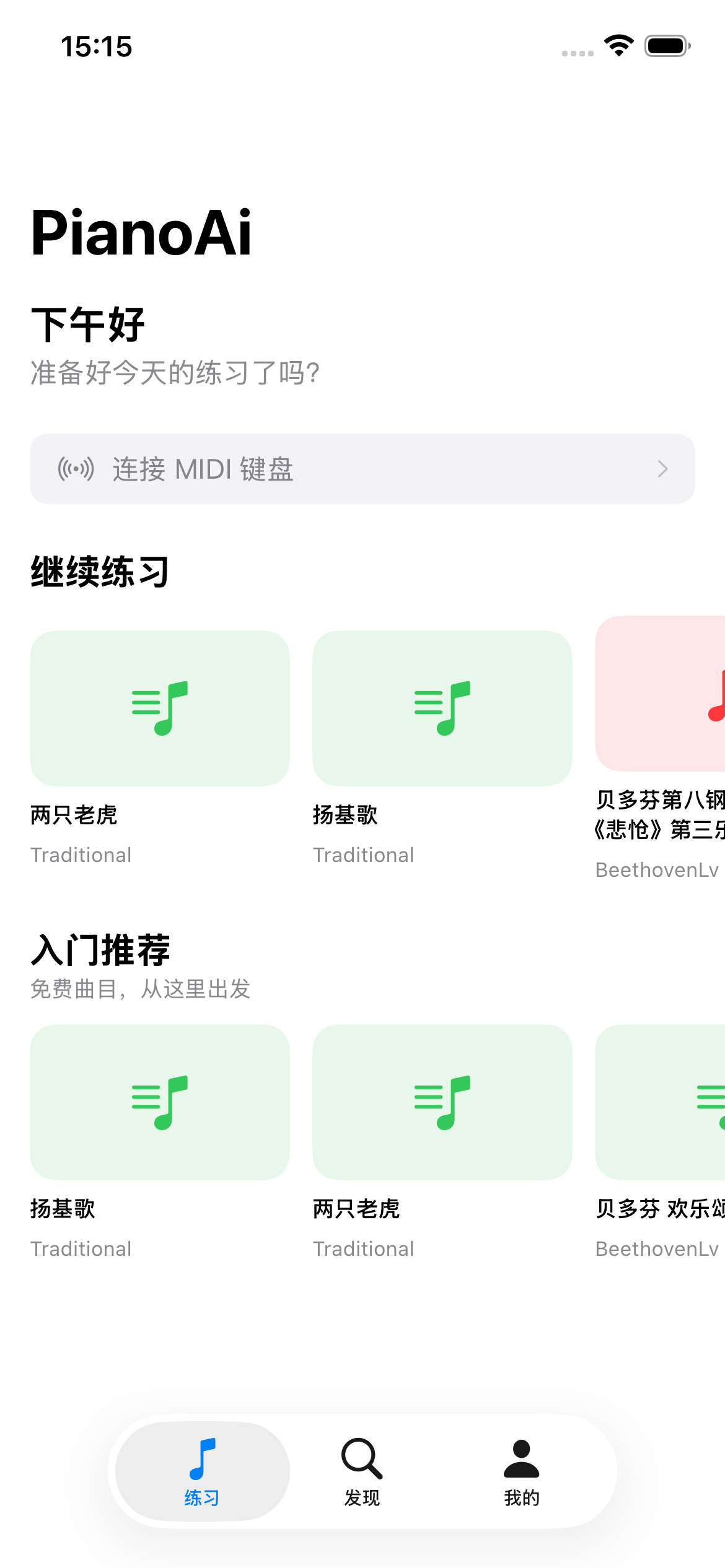
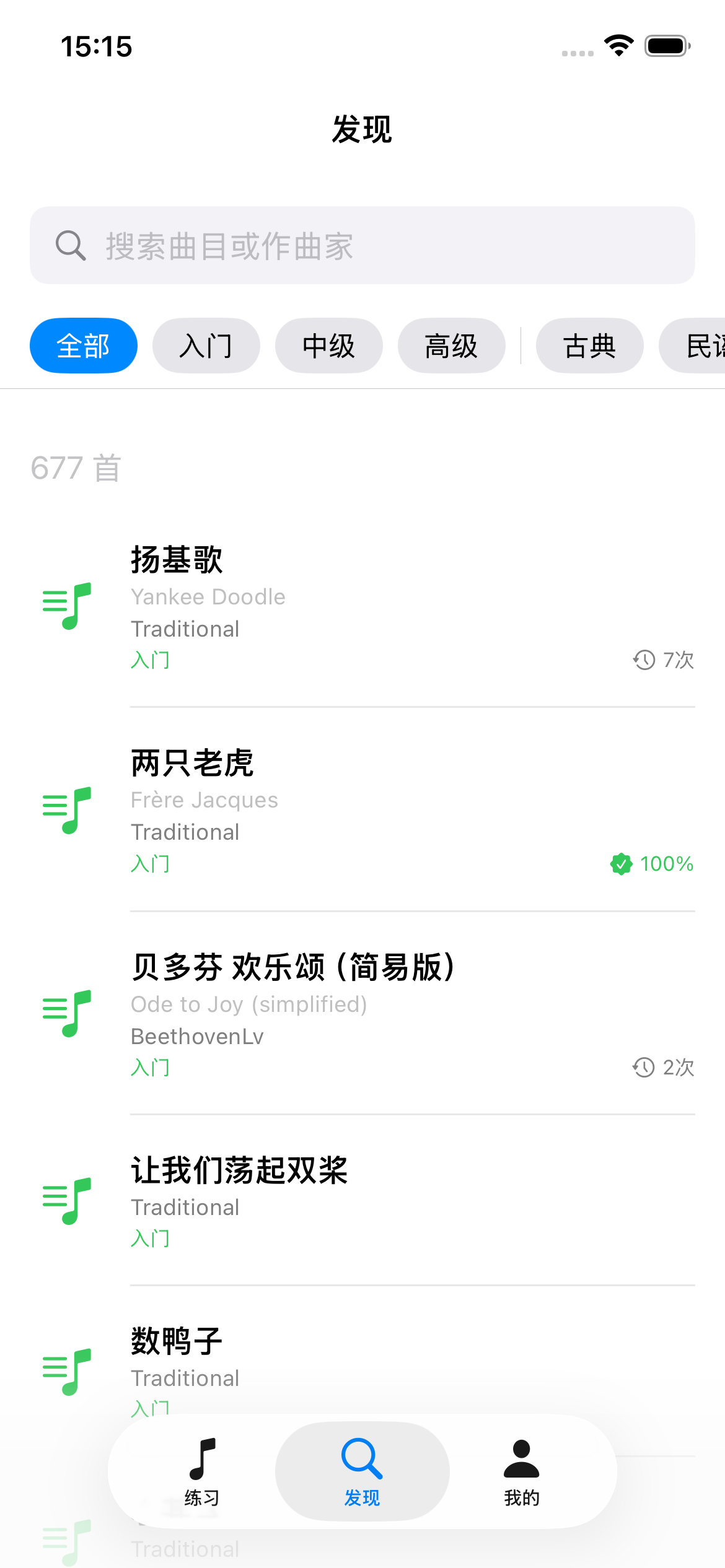
Three ways to learn
Learn with patient, step-by-step guidance, flip your phone and play it like a game, or follow the real score note by note.
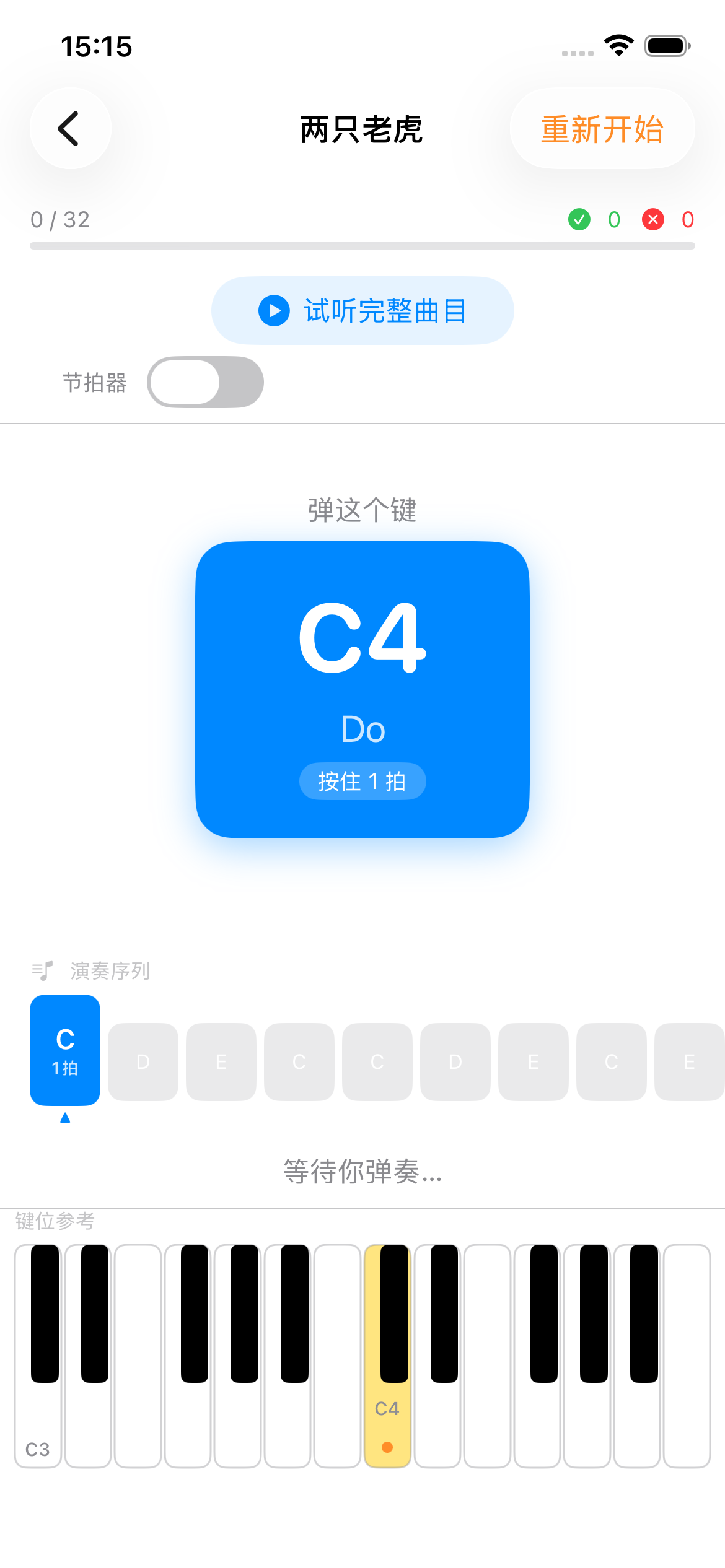
Follow along at your own pace
Notes light up as you go, and Piano AI waits for the right one before moving on — catching wrong notes and timing slips in real time, so you never practice mistakes.
- ✓Play at a tempo you choose
- ✓Note-by-note guidance that waits for you
- ✓Live note & rhythm correction
- ✓Built-in metronome
Or play it like a game
Turn your phone sideways and the notes fall in time with the music. Hit them as they land to score points — a fast, fun way to build timing, reflexes, and sight-reading.
- ✓Notes fall in time with the music
- ✓Landscape, full-screen play
- ✓Live scoring as you hit each note
- ✓Sharpens timing & sight-reading
Landscape rhythm play
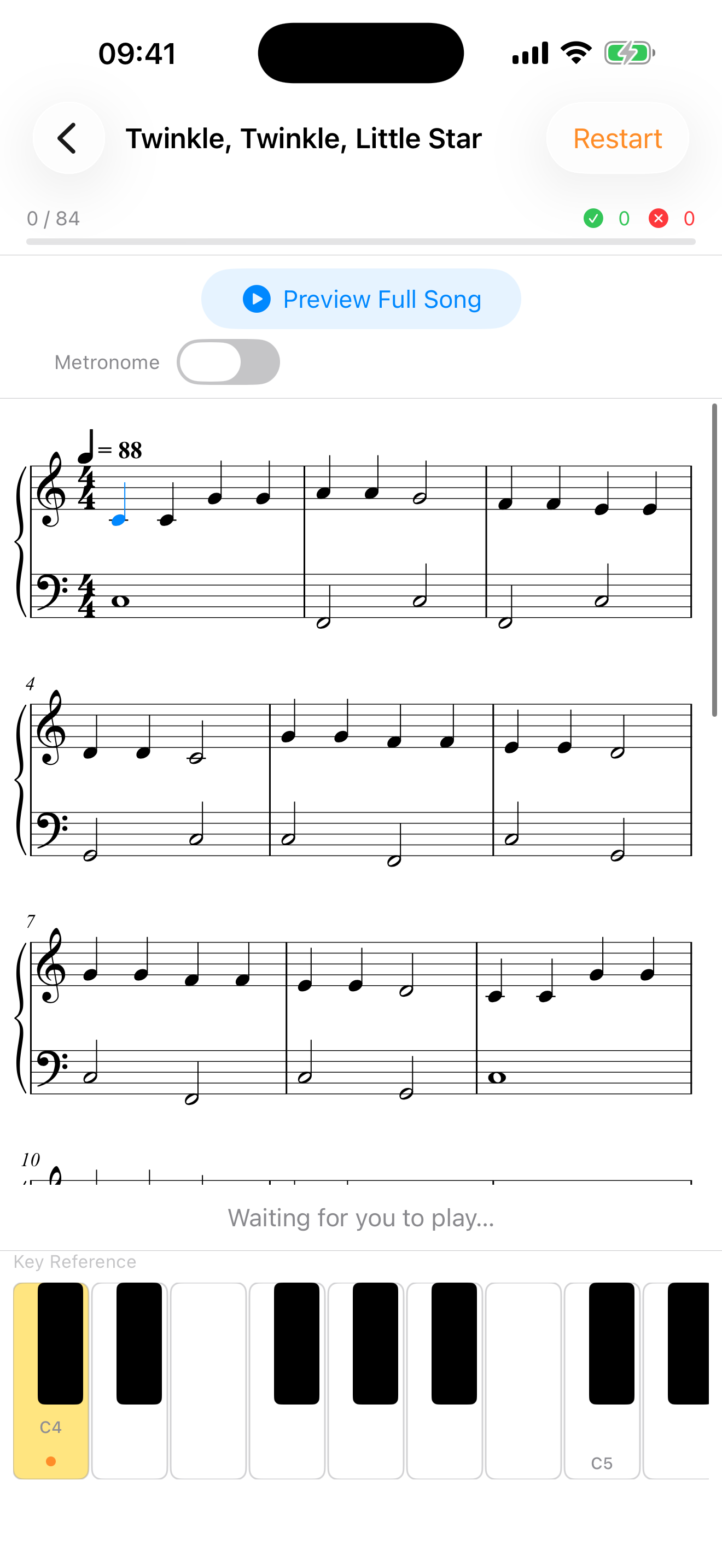
Sheet music view
Read the real score as you play
Practice from proper engraved notation, with the note you're on highlighted as you go. It's the bridge from playing by colour to genuinely reading music — built for theory study and graded exams.
- ✓Real engraved notation, not simplified bars
- ✓The current note stays highlighted as you play
- ✓Portrait on iPhone, full spread on iPad
- ✓Ideal for theory work and graded exams
- ✕Can't tell if you're playing the right notes
- ✕No feedback between lessons
- ✕Generic courses that don't fit your level
Piano AI listens, corrects, and adapts in real time.
Every time you play, our AI hears what you hear — catching wrong notes, timing slips, and tempo issues, then adjusting your practice plan so you always know exactly what to work on next.
Everything you need to learn piano
Piano AI combines AI listening technology with a friendly, structured curriculum designed for beginners.
Real-Time AI Feedback
Piano AI listens as you play and flags wrong notes, timing slips, and tempo issues the moment they happen.
MIDI Keyboard Support
Connect a digital piano or MIDI keyboard for precise, note-perfect tracking — or just play your acoustic and let the mic listen.
Hear It Before You Play It
Preview any song in full before you start, so you know how it should sound — and what you're working towards.
Personalized Learning Path
A quick assessment builds a practice plan matched to your level and goals — no guesswork about what to play next.
Curated Song Library
Real pieces with composer, arranger, and difficulty levels — from beginner melodies to advanced arrangements.
Progress & Practice Stats
Daily practice rings, weekly streaks, total minutes, and accuracy trends keep you motivated session after session.
From first note to full song in three steps
Tell us your goal
A quick assessment learns your experience level, goals, and the music you love.
Get your personalized plan
AI builds a path of songs and exercises matched to your skill level — no guesswork.
Practice & improve
Play along and get real-time feedback while Piano AI tracks your growth over time.
Watch yourself improve
Every session is measured, so progress never feels vague. Piano AI turns your practice into clear numbers — daily goals, streaks, and accuracy trends that keep you coming back.
- ✓Hit your daily practice-minute goal
- ✓Keep weekly streaks and active-day momentum
- ✓See accuracy climb as you improve
- ✓Count songs practiced and completed
Goal: 60 min
18 min to go — almost there
Works with the piano you already have
Whether you own a grand piano or a starter keyboard, Piano AI meets you where you are. All you need is your instrument and an iPhone.
Acoustic piano
Just play. Your phone's microphone listens to every note — no cables, no setup.
Digital keyboard
Use the built-in speakers and let the mic listen, or go wired for the most precise tracking.
MIDI connection
Connect a MIDI keyboard over USB or Bluetooth for note-perfect, zero-latency feedback.
Built to earn your confidence
Learning to play is personal. We handle your data with care and keep you in control every step of the way.
Sign in, password-free
Use Sign in with Apple, Google, or email. We never receive or store your Apple or Google password.
Your audio stays yours
The microphone is used only to analyze your playing and give feedback — never for advertising.
You're in control
Grant or revoke microphone access anytime in your device settings. You decide what Piano AI can hear.
Start free, upgrade when you're ready
Download and start playing for free. Plus unlocks the full library and sheet music — and your first week is on us.
Free
Everything you need to get started.
- ✓Starter song library
- ✓Real-time note & rhythm feedback
- ✓Practice and rhythm modes
- ✓Practice stats and streaks
Piano AI Plus
The full library, and the full method.
$6.67/month, billed annually
- ✓Everything in Free
- ✓All 800+ songs, every level
- ✓Sheet music view while you play
- ✓Full song preview before you play
- ✓New songs added every month
Prices shown in USD and may vary by region. Subscriptions renew automatically until cancelled — cancel anytime in your App Store settings.
Frequently asked questions
How do I create an account?
You can sign up with your email address, or use Google Sign-In or Sign in with Apple for quick, passwordless access. When you sign in with a third-party provider, Piano AI only receives basic profile information — such as your name and email address — to create and personalize your account. We never receive or store your Google or Apple password. Your information is handled in accordance with our Privacy Policy.
Do I need a real piano or keyboard?
Yes — Piano AI listens to your playing, so you'll need an acoustic piano or a digital keyboard with audio output. Any instrument you can play works.
Can I connect a MIDI keyboard?
Yes. You can connect a MIDI keyboard over USB or Bluetooth for the most precise, zero-latency note tracking. If you'd rather not use MIDI, the app's microphone listens to your playing instead.
What's the difference between Practice and Rhythm modes?
Practice Mode guides you note-by-note at a tempo you choose and waits for you to play the right note. Rhythm Mode is a scored, falling-notes game in landscape that helps you build timing and sight-reading.
What skill level is Piano AI for?
Piano AI is designed for complete beginners through early intermediate players, with content that grows alongside your skills.
How does the AI feedback work?
As you play, Piano AI listens in real time and compares what you played to the music, highlighting wrong notes, timing, and rhythm.
What is the sheet music view?
It shows the real engraved score while you play, keeping the note you're on highlighted so you can follow along. It's designed for people studying theory or working towards graded exams. The sheet music view is a Plus feature, and we're engraving scores for more songs all the time.
Is there a free version?
Yes. Piano AI is free to download and includes a starter song library, real-time feedback, both play modes, and your practice stats. Piano AI Plus unlocks all 800+ songs, the sheet music view, and full song previews — and your first week of Plus is free.
How much does Plus cost, and can I cancel?
Plus is $9.99 per month, or $79.99 per year (about $6.67 a month — roughly 33% less). Both plans start with a free 1-week trial. Prices are shown in USD and may vary by region. Subscriptions renew automatically, and you can cancel anytime from your App Store settings — you keep Plus until the end of the period you've paid for.
Is Piano AI available on Android?
Not yet — Piano AI is currently available on the App Store for iPhone and iPad. An Android version is in the works; follow us on social media to hear when it lands.